Why Driving License Renewal Is Important
A Driving license is very important for daily life. It allows safe and legal driving. When the license becomes expired, driving is not allowed. That is why Renewal is essential.
With Parivahan Sewa, renewal is now simple. The process is online and can be done from the comfort of home. No long lines. No stress. Check UIDAI portal for details before you apply for DL renewal.
From real experience helping people, those who apply one month before expiration face fewer problems. If the license expired five years ago, then a new application is required.
Check Driving License Application Status
After applying, always Check Driving license application status. This helps avoid confusion.
Follow this simple guide:
- Visit the Sarathi website
- Select your state
- Click the Application Status button in the navigation menu
- Enter:
- Application number
- Date of birth
- Captcha code
- Submit the details
This process allows users to track the application easily after applying.
Driving License Renewal Through Parivahan Sewa
If the license is expired, there is no need to worry. Renew it online using Parivahan Sewa.
The online Renewal process is very helpful for users. It can be done from home, which removes the need to travel or stand in long lines. It saves time and reduces stress because there are no repeated office visits. The steps are easy and clear, even for first-time users. To maintain validity of the driving license, the renewal must always be done on time.
Required Documents for DL Renewal
Before starting, keep all Required Documents ready. Missing papers cause delays.
Documents needed:
- Driving license no
- Age proof document
- Form 1A
- Medical certificate
- Application fees
Keeping scanned copies ready makes the process smooth.
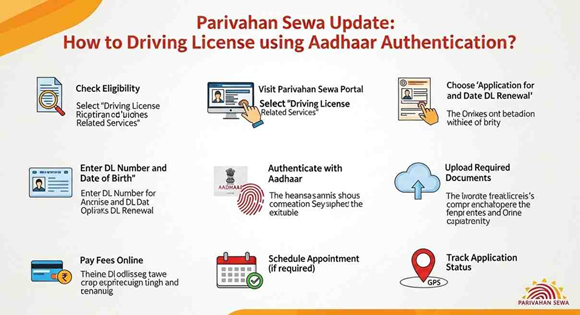
How to Apply on the Official Website
Follow these steps carefully:
- Go to the official website
- Select state name where the service is taken
- Click Apply for DL Renewal
- All license-related services will be displayed
Now move ahead:
- Fill applicant details
- Enter Driving license number
- Enter date of birth
- Enter captcha
- Click Get Details
RTO Selection and Address Details
Next steps:
- Select the RTO office
- Choose the correct office carefully
- Enter the address where the renewed license will be received
Correct address ensures timely delivery.
Aadhaar Authentication and e-KYC
This is the most important step.
- Choose Authentication through e-KYC
- Click Submit via Aadhaar option
- Enter Aadhaar number
- Verify using OTP
Data is matched with UIDAI records. If Aadhaar details are missing, use my aadhar or aadhar card download service to update the aadhar card.
Note:
- Using my Aadhar Authentication → no need to visit RTO
- Without Aadhaar → physical verification is required
Selecting Services and Uploading Documents
Next steps:
- Select required DL services
- Tick Renewal
- Click processed
Upload files:
- Medical certificate
- Age proof
- Driving license
- Photo
- Signature
Upload rules:
- Passport-sized image
- Ensure file size is less than 20kb
Fee Payment and Receipt Download
Now complete the payment:
- Pay renewal application fee
- Payment modes available:
- UPI
- Debit card
- Netbanking
After payment:
- Download the receipt
- Keep it safe for future use
Receiving the Renewed Driving License
After approval:
- Receive the DL at your address
- Delivery happens within 10-15 days
People who keep correct details face no delay. Clean records and correct Aadhaar, documents, and payment lead to smooth service.